I've been using SmartThings home automation controller since basically it's release to the public last year. There have been some growing pains with the system - some of it due to my learning curve, and some due to bugs that they have generally fixed fairly quickly.
This morning I was faced with a very difficult decision regarding their mobile apps. Major update coming down the tubes from their system to all my mobile devices, along with a big red flag.
This app requires (new) additional permissions: Contacts and Wi-Fi Connection Status.
I get the Wi-Fi status thing. But Contacts? Ummm . . . no.
To their credit I received a very quick response when I posted a complaint on their forum - but it was to explain why they needed this new permission.
Quote:
"Contacts access allows greatly improved notification options for SmartApps like Smart Home Monitor. "
I remain unconvinced.
Sadly, I may have to change my controller. Worse, this controller was one of the few (if not the only) that provided a mobile app for all three platforms: iOS, Android and Windows mobile. I really hate losing that cross platform compatibility.
For now I intend to defer the update and wait and see how long the old version of their App works until I'm cut off. Perhaps they will change this in the near future. If not . . . back to research mode for me.
Friday, September 4, 2015


Friday, August 28, 2015
"Something Happened 0x800704DD - 0x90016" Windows 10 Media Creation Tool (Solved)
"Something Happened 0x800704DD - 0x90016"
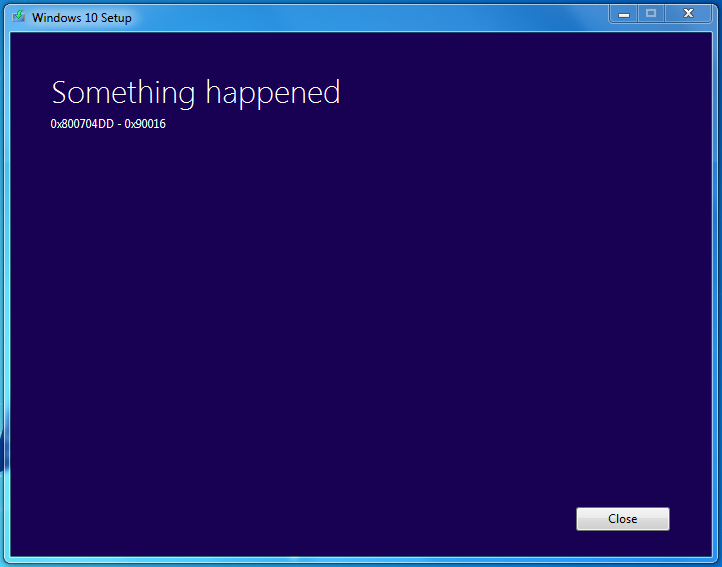
Came across this error while attempting to download the Windows 10 Installer to a blank USB drive using the Media Creation Tool from Microsoft.
Disregarding the inherent humor involved about how useless this error is for a normal end-user, the solution turned out to be simple:
Scenario: you were logged onto the host machine as a Standard user, you ran the Media Creation Tool, which popped up the request for the local administrators credentials, which you provided. Then you got the error . . .
Solution: Log out of your standard user account, then log in as a local administrator. Run the Media Creation tool and all should be well.
Notes: This goes against the long running advice that I and others have preached for years - don't run your daily usage work as a local admin account, instead set your normal account as a Standard User. But if you followed all the steps of the advice then you created a real admin account for those times you needed to install or update things. That model usually worked from your standard account by entering the credentials for the admin account into the resulting popup window when you launched an installer. Trouble is, even though in this case the popup DID ask for the admin password, the media creation tool broke.
Classic case of Microsoft not playing by their own rules.
Let me know in the comments if this helped, or not - and if not if you found a solution (and please, what that solution was for you.)
Cheers!
Saturday, August 16, 2014
August 2014 Patch Tuesday Blues: BSOD after patching Microsoft Windows 7 x64
A few machines running Windows 7 under my client list started blue screening on boot right after the August 2014 patches from Microsoft were installed.
Microsoft is aware of the problem impacting a very few workstations (relatively speaking - we're still talking perhaps many thousands out of millions) and is working on a fix. This does not help if you can't boot into the system to apply that fix when it eventually appears in Windows Updates.
While we wait for Microsoft to re-release what appears to be a bad kernel patch related to fonts - here is a quick and dirty workaround to prevent the BSOD and return you to productive work. (Play?)
Either mount the system drive on another machine ( I use my handy USB dock ) or boot the bluesy machine into a CMD prompt using your favorite recovery method. (Windows Setup: Repair, many Linux bootstrappers, the Windows PE environment, etc.)
Locate and rename or delete the file: FNTCACHE.DAT in the "C:\Windows\System32\" folder.
Reboot back into the normal OS and you should be good to go.
Alternately you can restore from a previous working version using the boot menu if your system is set to create regular restore points. If you do this, you should then hide the below listed updates in Automatic Updates before they get re-installed and cause the BSOD to return.
This appears to be related to one or a combination of the following KB's released this Tuesday:
KB2982791, and possibly KB2976897 or KB2970228.
~~~
UPDATE: Microsoft has posted a more complete set of instructions on how to recover from the BSOD in this case at http://support.microsoft.com/kb/2982791
. . . scroll down to the section titled "Known Issue 3."
Thursday, January 31, 2013
Small Business Server 2011 Console "Unexpected error occurred"
Note to all admins responsible for the care and feeding of Windows Small Business Server 2011: Do NOT install December 2012s WMF 3.0 update on your server.
Error's you might already be encountering:
1) Odd popup error in the Windows Small Business Server Console when you edit almost anything:
"Unexpected error occurred."
Clicking help . . . doesn't . . . gee thanks Microsoft for the awesome nonsense error.
2) Creating a new user account fails to create their mailbox (and all following actions that depend on a mailbox existing also fail.)
3) Adding a new user mailbox or room/resource in the Exchange 2010 Console fails to set the proper permissions for the Exchange server to manage the mailbox.
*( If you did not notice this problem, and you have created new mailboxes since the WMF patch was installed, you need to check them right away. Compare the permissions for a healthy mailbox - note that SYSTEM and three Exchange service accounts that should have rights to all normal objects are missing on the newer mailboxes. )*
4) Exchange 2010 rollups fail to install and may exit without restarting the Exchange services.
5) PSConfig.exe fails to complete after patching Sharepoint. (You do run PSConfig after most patches, right?)
Resolution:
If you've been experiencing these errors then check your Windows Updates log for Windows Management Foundation 3.0 (KB 2506143). The good news is you can safely Uninstall it. Be sure to reboot afterwards.
Viola . . . all better.
Of interest is that Microsoft no longer offers that patch to SBS 2011 systems, but from mid-December through the new year 2013 it was listed as an optional patch.
Don't feel bad . . . I learned this one the hard way too.
Error's you might already be encountering:
1) Odd popup error in the Windows Small Business Server Console when you edit almost anything:
"Unexpected error occurred."
Clicking help . . . doesn't . . . gee thanks Microsoft for the awesome nonsense error.
2) Creating a new user account fails to create their mailbox (and all following actions that depend on a mailbox existing also fail.)
3) Adding a new user mailbox or room/resource in the Exchange 2010 Console fails to set the proper permissions for the Exchange server to manage the mailbox.
*( If you did not notice this problem, and you have created new mailboxes since the WMF patch was installed, you need to check them right away. Compare the permissions for a healthy mailbox - note that SYSTEM and three Exchange service accounts that should have rights to all normal objects are missing on the newer mailboxes. )*
4) Exchange 2010 rollups fail to install and may exit without restarting the Exchange services.
5) PSConfig.exe fails to complete after patching Sharepoint. (You do run PSConfig after most patches, right?)
Resolution:
If you've been experiencing these errors then check your Windows Updates log for Windows Management Foundation 3.0 (KB 2506143). The good news is you can safely Uninstall it. Be sure to reboot afterwards.
Viola . . . all better.
Of interest is that Microsoft no longer offers that patch to SBS 2011 systems, but from mid-December through the new year 2013 it was listed as an optional patch.
Don't feel bad . . . I learned this one the hard way too.
Wednesday, December 12, 2012
Dexter - infecting a point of sale near you
Breaking news - more action steps to be provided later as I can find/collate/analyze it.
Two links for more information:
Dexter - Draining blood out of Point of Sales
"Dexter" malware steals credit card data from point-of-sale terminals
Quote:
Dexter is stealing the process list from the infected machine, while parsing memory dumps of specific POS software related processes, looking for Track 1 / Track 2 credit card data. This data will most likely be used by cybercriminals to clone credit cards that were used in the targeted POS system.
Initial action steps recommended:
Merchants:
Check back end servers for unusual outgoing Internet activity.
Run updated AV deep scans on all equipment in the Credit Card transmit path. (POS terminals, backend, database)
. . . more forthcoming . . .
Consumers:
Stop using Debit cards (I've said this before). Credit cards have much better fraud protection and won't cause you to lose your checking/savings account balances overnight if you get hit.
If you have shopped with your credit or debit card at any restaurant or merchant in the last three months, you should carefully check your transaction history for those cards - a good practice to do in any case and even more vital now.
Two links for more information:
Dexter - Draining blood out of Point of Sales
"Dexter" malware steals credit card data from point-of-sale terminals
Quote:
Dexter is stealing the process list from the infected machine, while parsing memory dumps of specific POS software related processes, looking for Track 1 / Track 2 credit card data. This data will most likely be used by cybercriminals to clone credit cards that were used in the targeted POS system.
Initial action steps recommended:
Merchants:
Check back end servers for unusual outgoing Internet activity.
Run updated AV deep scans on all equipment in the Credit Card transmit path. (POS terminals, backend, database)
. . . more forthcoming . . .
Consumers:
Stop using Debit cards (I've said this before). Credit cards have much better fraud protection and won't cause you to lose your checking/savings account balances overnight if you get hit.
If you have shopped with your credit or debit card at any restaurant or merchant in the last three months, you should carefully check your transaction history for those cards - a good practice to do in any case and even more vital now.
Friday, November 9, 2012
Tuesday, August 14, 2012
Microsoft Update KB2647753 is broken (Fix it)
Update: Looks like Microsoft has pulled the offending patch. Expect it to be released again sometime in the near future - hopefully without further problems. If you see a repeat update and don't want to apply the manual fix, simply force a new check for updates. If you prefer to be fully patched, then you can proceed directly to the fix it section below.
~~~
One of the Recommended Updates for patch Tuesday of August 2012 is broken. When you install updates and reboot, you will see the patch for KB2647753 presented. Installing it (again and again) will not make it go away. Each time it will claim to have been successful . . . but I'm not certain that's true. Worse, your system may insist on attempting to re-install this patch every time you shut down your workstation - prolonging the shut down procedure.
Hopefully Microsoft will notice this problem later today or perhaps this week and fix the problem from their end.
Until they do, you have two options.
1) Ignore it, or hide it (not really recommended)
2) Fix the problem manually.
What is KB2647753?
It's a non-critical but recommended update to the printing core components for Windows 7 and Server 2008. It does not apply to Server 2003 or Windows XP.
Here's how to manually fix it:
a) Open your Control Panel, go to "Programs and Features" (also known as "Uninstall a program" if you use the Category view in Control Panel)
b) Click the link on the left to "View installed updates"
c) I recommend changing the view to Detailed view and sorting on Name, then scroll down to the Microsoft Windows section and locate: "Update for Microsoft Windows (KB2647753)"
d) Right click KB2647753 and UNinstall it . . . wait for the process to complete.
e) Reboot your workstation
f) Get over to http://support.microsoft.com/?kbid=2647753 and download the full installer for this patch - make sure you get the right version for your OS including x86 versus x64. You will be asked to allow Microsoft to Validate your Windows OS license.
g) Run that installer, let it complete, then reboot your workstation again.
h) Check your Windows Update, force a check for updates, and the repeat offender should now be gone.
Hope this helps.
~~~
One of the Recommended Updates for patch Tuesday of August 2012 is broken. When you install updates and reboot, you will see the patch for KB2647753 presented. Installing it (again and again) will not make it go away. Each time it will claim to have been successful . . . but I'm not certain that's true. Worse, your system may insist on attempting to re-install this patch every time you shut down your workstation - prolonging the shut down procedure.
Hopefully Microsoft will notice this problem later today or perhaps this week and fix the problem from their end.
Until they do, you have two options.
1) Ignore it, or hide it (not really recommended)
2) Fix the problem manually.
What is KB2647753?
It's a non-critical but recommended update to the printing core components for Windows 7 and Server 2008. It does not apply to Server 2003 or Windows XP.
Here's how to manually fix it:
a) Open your Control Panel, go to "Programs and Features" (also known as "Uninstall a program" if you use the Category view in Control Panel)
b) Click the link on the left to "View installed updates"
c) I recommend changing the view to Detailed view and sorting on Name, then scroll down to the Microsoft Windows section and locate: "Update for Microsoft Windows (KB2647753)"
d) Right click KB2647753 and UNinstall it . . . wait for the process to complete.
e) Reboot your workstation
f) Get over to http://support.microsoft.com/?kbid=2647753 and download the full installer for this patch - make sure you get the right version for your OS including x86 versus x64. You will be asked to allow Microsoft to Validate your Windows OS license.
g) Run that installer, let it complete, then reboot your workstation again.
h) Check your Windows Update, force a check for updates, and the repeat offender should now be gone.
Hope this helps.
Monday, July 16, 2012
Close port 3389 (Remote Desktop) on your firewalls NOW
If you have allowed the Remote Desktop protocol direct access through your firewall (port 3389), and you have an answering RDP server behind it, you may soon be compromised with a very nasty ransomware takeover that encrypts your data files.
Picked up two new clients this week, both were attacked and taken over by a remote entity. Both lost substantial company data. One was saved by a rotating backup -- they were able to restore from that after the hack was shut down. The other did not have an offsite backup, and they lost data that we will never recover.
The hacker did the following:
1) Installed a process that began encrypting all docs, pdfs, jpgs, and several other file formats into a secure RAR archive form. It then secure deleted the originals. The encrypted files look like
yourfilename.txt(!! to decrypt email id 0000000 to securityxxxxx@gmail.com !!).exe
2) Installed a Group Policy script that enabled the Guest account, set an unknown password on it, and gave it carte blanche access to all administrative roles including RDP. That script was set to run on any users login, so disabling the Guest account would only hold until the next time the admin logged in.
3) Locked the login screen for all users on the server with a ransomware scare tactic screen claiming to be from the FBI. The ransom was listed at $1,000. Judging from a few forum posts on the topic, paying the ransom does not guarantee recovery of the lost data. This criminal is laughing all the way to the bank with the victims money and not actually delivering their locked data.
4) Uninstalled anti-virus products.
5) Deleted any backups that were connected to the server via USB or LAN. Also deleted any online backups through the service application (Carbonite in this case.)
6) Disabled the F8 start up key to prevent booting into safe mode.
7) Turned off Shadow Copies on all shares - and deleted the historical stored revisions of files.
8) Several other configuration settings were damaged to make the system more vulnerable to future attacks.
None of this was flagged by Anti-Virus protection because guess what? It looked like a virus but was not . . . it appears to be a direct hack to the system by an outside person(s).
If you need remote desktop access, reduce your risk;
- use a secure VPN connection to get to your LAN from the outside
- make sure your security policy includes strong passwords
- change the name of the default Administrator account
- check group policy and set the system to lock out failed passwords after 3 attempts for a minimum of 15 minutes (longer is better if your user base can stand it)
- confirm that the server patch MS12-020 was installed successfully earlier this year.
More info here: http://www.bleepingcomputer.com/forums/topic449398.html/
Monday, May 14, 2012
Update: Travelers alert concerning fake update alert popups
Recently the IC3 released an advisory containing sparse detail that travelers abroad are being infected via fake update alerts for unnamed products that were being delivered over compromised hotel connections. I wrote a speculative article about this, and wanted to provide some clearer detail about what appears to be happening.
First: It does not appear that the "real" update mechanisms for any of the likely products are compromised. I still can't recommend you do *any* updates while traveling. Do them before, or after. Besides, who want's to download a large update over what is typically a slow connection at that overseas hotel?
Second: Through either captive portal DNS, or via Javascript injection delivered by the compromised guest connection, these popups are being delivered primarily through the browser - just like "normal" malware popups. I speculate that there may also be a class of these threats that try to take advantage of unpatched systems -- just like the ones you see from compromised websites or from clicking the wrong spam email link.
In the former case, the sample I recently observed looked like a browser popup, mocked up to resemble (poorly) an actual update alert from Adobe. An unwary traveler might be fooled by this, it scares me to think how many . . .
In the latter case, the attack could exploit known vulnerabilities in either Java, Flash or the OS to deliver a small software stub that does a much better job of presenting the intended victim a realistic looking (but still fake) update alert. This is much like the numerous examples of fake anti-virus infections that have plagued the Internet for the last few years. Your best bet to prevent this is -- as always -- to stay on top of your system updates for the OS, Java, Flash, etc.
Third: Some reminders of safe guest connection usage to prevent ID Theft, infection etc.
Cheers!
First: It does not appear that the "real" update mechanisms for any of the likely products are compromised. I still can't recommend you do *any* updates while traveling. Do them before, or after. Besides, who want's to download a large update over what is typically a slow connection at that overseas hotel?
Second: Through either captive portal DNS, or via Javascript injection delivered by the compromised guest connection, these popups are being delivered primarily through the browser - just like "normal" malware popups. I speculate that there may also be a class of these threats that try to take advantage of unpatched systems -- just like the ones you see from compromised websites or from clicking the wrong spam email link.
In the former case, the sample I recently observed looked like a browser popup, mocked up to resemble (poorly) an actual update alert from Adobe. An unwary traveler might be fooled by this, it scares me to think how many . . .
In the latter case, the attack could exploit known vulnerabilities in either Java, Flash or the OS to deliver a small software stub that does a much better job of presenting the intended victim a realistic looking (but still fake) update alert. This is much like the numerous examples of fake anti-virus infections that have plagued the Internet for the last few years. Your best bet to prevent this is -- as always -- to stay on top of your system updates for the OS, Java, Flash, etc.
Third: Some reminders of safe guest connection usage to prevent ID Theft, infection etc.
- Never, ever, click on a popup window while browsing the Internet. Close it via Task Manager or by using ALT-F4.
- Never access secure websites like your bank while on a guest connection unless you are also using VPN or similar safeguards to prevent snooping.
- Don't leave your computer unattended while connected to a guest connection. Let it go to sleep, or hibernate, or disconnect it for localized work, or shut it down when you are done with your session.
- Pay careful attention to the guest connections usage instructions (if the hotel or facility provides such) . . . in particular make sure you are connecting to their actual hotspot, not a fake one with a similar name in range.
- When you first connect to a guest connection, Vista and Windows 7 will ask you if this is a Home, Work or Public connection. ALWAYS select Public - this tells your OS to use a higher security level on its built in firewall. Other third party software firewall solutions generally also prompt you on the trust level you want to give a guest connection, always choose the most restrictive profile available.
- Assume that any guest connection, whether at a hotel, coffee shop, truck stop, conference center, airport, etc, is suspect. Also don't assume that the IC3's advisory should only be taken for overseas travel. Similar attack methods have occurred in the past in the US, Canada and elsewhere. They can take place on both wireless and wired connections.
Cheers!
Wednesday, May 9, 2012
Add system updates to your travel preparation list
Update: Travelers alert concerning fake update alert popups
It's come to this, a problem that I first thought of several years ago (that blog is dead or I would link it) has finally come to pass.
Updates for certain common plugins are being spoofed on guest connections at hotels, airports and probably other Wi-Fi hotspots. And you should not assume it's just Wi-Fi, it could also be an Ethernet cable connection in the hotel room, or at the guest services room at the conference center.
Travelers to (for now*) undisclosed foreign countries have become victims to malware being presented in a popup window that claims to be a well known and frequently updated plugin. I would guess Adobe Flash, could also be Adobe Reader or Oracle Java.
It's become serious enough that the IC3 and the FBI have posted a travelers advisory about the issue.
Malware Installed on Travelers' Laptops Through Software Updates on Hotel Internet Connections
Recent analysis from the FBI and other government agencies demonstrates that malicious actors are targeting travelers abroad through pop-up windows while establishing an Internet connection in their hotel rooms.
Recently, there have been instances of travelers' laptops being infected with malicious software while using hotel Internet connections. In these instances, the traveler was attempting to setup the hotel room Internet connection and was presented with a pop-up window notifying the user to update a widely-used software product. If the user clicked to accept and install the update, malicious software was installed on the laptop. The pop-up window appeared to be offering a routine update to a legitimate software product for which updates are frequently available.
* I'm going to extrapolate into the future a bit: It's only a matter of time before this a) spreads to the US and b) expands to include Windows Updates and other popular updates.
What should you do to protect yourself?
Remembering that it's become vitally important to stay patched for all MS products, Adobe products and Java - and that you should be as current in your updates as possible, it may be better to delay patches if they come out during your travel.
Better yet, add system maintenance to your list of things to complete just before you depart for your trip! Do it from a trusted Internet connection: home or work.
And a short reminder of the top four items to check at least monthly:
1) Microsoft Updates: released every second Tuesday of each month.
2) Adobe PDF and Flash updates at www.adobe.com: no set release schedule, but check monthly. (I do this for manual patched systems on the same day I deploy MS patches.)
3) Java (now from Oracle) at www.java.com.
4) Firefox (if you are a fan).
And during the trip? From now on: IGNORE update reminders when connected to a guest Internet service.
It's come to this, a problem that I first thought of several years ago (that blog is dead or I would link it) has finally come to pass.
Updates for certain common plugins are being spoofed on guest connections at hotels, airports and probably other Wi-Fi hotspots. And you should not assume it's just Wi-Fi, it could also be an Ethernet cable connection in the hotel room, or at the guest services room at the conference center.
Travelers to (for now*) undisclosed foreign countries have become victims to malware being presented in a popup window that claims to be a well known and frequently updated plugin. I would guess Adobe Flash, could also be Adobe Reader or Oracle Java.
It's become serious enough that the IC3 and the FBI have posted a travelers advisory about the issue.
Malware Installed on Travelers' Laptops Through Software Updates on Hotel Internet Connections
Recent analysis from the FBI and other government agencies demonstrates that malicious actors are targeting travelers abroad through pop-up windows while establishing an Internet connection in their hotel rooms.
Recently, there have been instances of travelers' laptops being infected with malicious software while using hotel Internet connections. In these instances, the traveler was attempting to setup the hotel room Internet connection and was presented with a pop-up window notifying the user to update a widely-used software product. If the user clicked to accept and install the update, malicious software was installed on the laptop. The pop-up window appeared to be offering a routine update to a legitimate software product for which updates are frequently available.
* I'm going to extrapolate into the future a bit: It's only a matter of time before this a) spreads to the US and b) expands to include Windows Updates and other popular updates.
What should you do to protect yourself?
Remembering that it's become vitally important to stay patched for all MS products, Adobe products and Java - and that you should be as current in your updates as possible, it may be better to delay patches if they come out during your travel.
Better yet, add system maintenance to your list of things to complete just before you depart for your trip! Do it from a trusted Internet connection: home or work.
And a short reminder of the top four items to check at least monthly:
1) Microsoft Updates: released every second Tuesday of each month.
2) Adobe PDF and Flash updates at www.adobe.com: no set release schedule, but check monthly. (I do this for manual patched systems on the same day I deploy MS patches.)
3) Java (now from Oracle) at www.java.com.
4) Firefox (if you are a fan).
And during the trip? From now on: IGNORE update reminders when connected to a guest Internet service.
Subscribe to:
Posts (Atom)